
Searching for Fullerton portal can drop you into at least four different places. Only one of them is probably what you actually need right now. Cal State Fullerton (CSUF) runs a campus portal called YOU. Fullerton College and the rest of the North Orange County Community College District (NOCCCD) use myGateway. Access the Fullerton Portal (CSUF YOU) to sign in with your campus credentials, approve Duo 2FA, and reach Canvas, Titan Online, email, and more.
Students living on campus at CSUF use a different Student Housing Portal. Families in the Fullerton School District log in to PowerSchool Parent Portal, which isn’t related to either college. If you’re a CSUF student, applicant, faculty, or staff, you’ll start at the YOU campus portal. Sign in with your campus username, password, and a Duo two-factor approval.
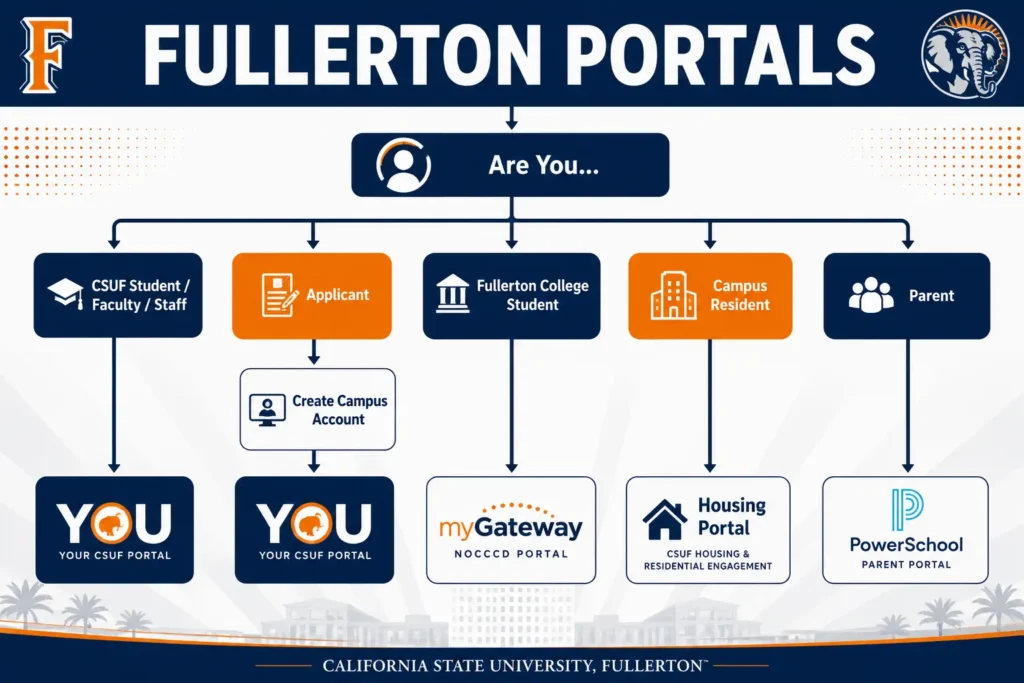
Everything else—Titan Online apps, Canvas, your CSUF email—lives inside that portal or uses the same credentials. It’s all pretty connected once you’re in. Below, you’ll see how to tell these systems apart, how to get through the CSUF login step-by-step, where to find the most-used academic and employee tools, and what to do if your password or Duo prompt won’t cooperate. Setbacks at this stage happen a lot, but almost all of them are fixable in a few minutes.
Choose The Correct Cal State Fullerton Portal Sign-In
Picking the right portal saves more time than any troubleshooting. Your role and institution decide which portal accepts your credentials.
Mixing them up is the most common reason a valid password suddenly doesn’t work.
CSUF YOU For Students, Faculty, And Staff
YOU is the single sign-on portal for California State University, Fullerton. Admitted and enrolled students, applicants, instructors, and employees all use it.
Your username is the part of your CSUF email address before the @ symbol. Once inside, tiles take you to Titan Online, Canvas, Outlook, and other role-specific tools.
Alumni have their own Alumni Portal. Student tiles won’t show up there.
Fullerton College And NOCCCD Account Access
Fullerton College, founded in 1913, is a community college and isn’t part of Cal State Fullerton. Its students use myGateway, the shared NOCCCD portal that also serves Cypress College.
myGateway handles registration, financial aid, and fee payments for those colleges. Sometimes, financial aid documents will take you to a separate student forms site with its own sign-in.
If you attend both institutions, you’ll need to keep two sets of credentials straight. They’re totally unrelated accounts.
Housing And Parent Services
CSUF’s Student Housing Portal is a different system for applying to live on campus or for residents managing their assignment. It uses your Cal State Fullerton username and password, but you reach it through Housing and Residential Engagement, not a Titan Online tile.
Off-campus apartment complexes near Fullerton usually use commercial resident portals. Those are private landlord systems.
Parents looking for K-8 student grades or attendance need the Fullerton School District’s PowerSchool Parent Portal.
Sign In To CSUF YOU
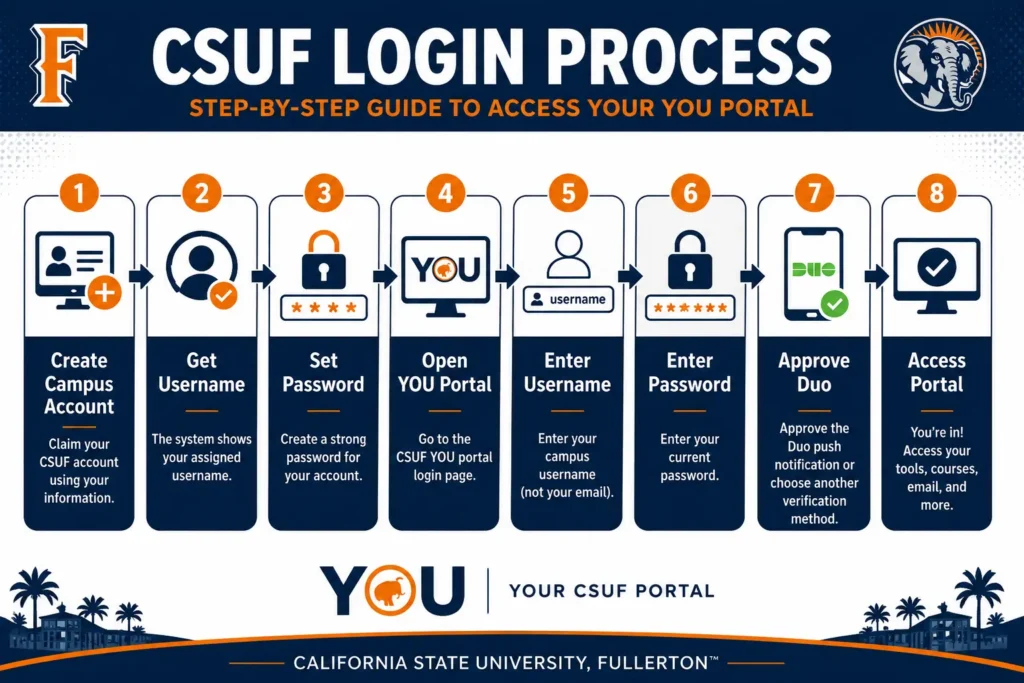
The CSUF login flow has three parts: claiming your account, entering your campus credentials, and approving a Duo prompt. New students and applicants have to do the first step before the second one works.
Create Your Campus Account
If you just applied or were admitted, your account won’t exist until you claim it. On the portal login page, pick Create my campus account and answer the identity questions.
Have your CSUF ID number and date of birth handy. The system shows you your assigned username and asks you to set a password.
There might be a short delay between your application and account eligibility. If the claim page can’t find you, wait a day and try again.
Use Your Campus Username And Password
Head to the CSUF portal and choose Portal for Student, Faculty and Staff. Enter your campus username (not your full email address), then your current password.
If you can’t remember the username, use the Forgot your username? link instead of guessing.
One practical tip: browser-saved passwords often lag behind a recent reset. Type it manually the first time after any password change.
Complete Duo Authentication
Duo two-factor authentication is required, so your password alone won’t get you in. After you submit your credentials, Duo sends a push notification to your enrolled device or offers another method.
Approve the request and you’re in.
- Enroll a second device or add a backup phone number
- Save your bypass codes somewhere you can reach without your phone
- Reinstall and re-enroll Duo Mobile before you replace or wipe a phone
Find Academic And Employee Tools
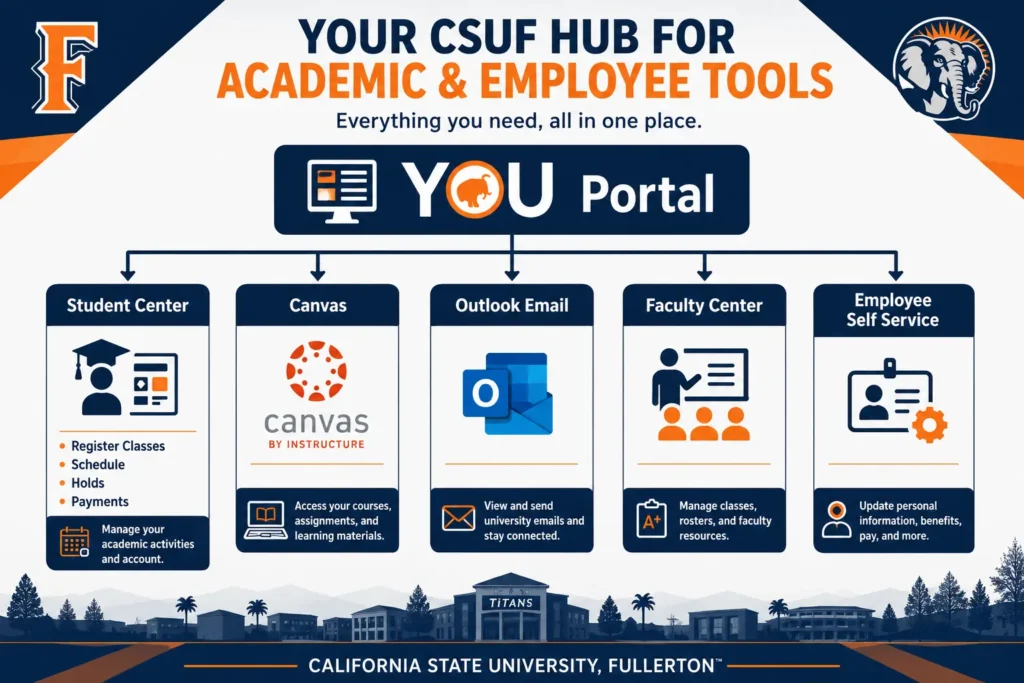
Once you’re inside YOU, most transactional work happens in Titan Online, the campus name for its PeopleSoft applications. The tiles you see depend on your role and permissions, so students and staff rarely see the same thing.
Open Titan Online Apps
Titan Online is a collection of PeopleSoft modules for student records, HR, and finance. You launch them from inside the portal, not separately.
If a Titan Online link asks for credentials again, your portal session probably expired. Go back to the portal, sign in fresh, and relaunch from the tile.
Access Student Center And Degree Planning
Student Center is where you register for classes, view your schedule, check holds, see your account balance, and update contact info. It’s the tile students use the most.
Degree planning tools are nearby: your academic requirements report shows what’s left for your major, and the planner lets you map future terms. Advisors see the same data, so reviewing it first makes appointments way more productive.
Mobile access is available through the iFullerton app, which brings Student Center, course info, and campus messages into a phone-friendly layout.
Use Faculty And Employee Self Service
Instructors use Faculty Center to view class rosters, record grades, and check enrollment counts by section. Grade rosters open and close on fixed dates, so double-check the deadline before entering grades.
Employee Self Service handles timekeeping, absence reporting, pay stubs, tax withholding, and benefits enrollment for state employees.
Auxiliary Services Corporation staff have a separate employee portal for some HR functions. If a tile you expect is missing, your department usually assigns permissions.
Access Learning And Housing Systems
Not every CSUF service lives behind a portal tile, and knowing which ones stand alone can really save you time. Canvas and the housing portal both accept your campus credentials, but you reach them differently.
Launch Canvas From Your Account
Canvas is the campus learning management system. That’s where you’ll find course materials, assignments, discussions, quizzes, and grades posted by your instructors.
Launch it from your portal or sign in directly with your campus username and password. Courses show up in Canvas only after your instructor publishes them, usually a few days before the term starts. An empty dashboard the week before classes is normal—not a registration issue.
Use The CSUF Student Housing Portal
The Student Housing Portal is the main place to apply for on-campus housing and take care of resident business after you move in. Sign in with your Cal State Fullerton username and password, then pick the Application tab to start or continue an application.
Applications open on published dates each year, and steps like room selection and roommate matching have their own timelines. Check the Housing and Residential Engagement calendar instead of waiting for a portal reminder.
Know When A Separate Login Is Required
Some systems accept your CSUF credentials but sit outside the portal, and a few aren’t CSUF systems at all.
| System | How you get in |
|---|---|
| Titan Online, Student Center, Faculty Center | Tile inside YOU |
| Canvas | Portal tile or direct campus sign-in |
| CSUF email (Outlook) | Portal tile, or Outlook using your full @csu.fullerton.edu address |
| Student Housing Portal | Campus credentials, separate site |
| myGateway (Fullerton College) | NOCCCD account, unrelated to CSUF |
| PowerSchool Parent Portal | Fullerton School District account |
Resolve Account And Login Problems
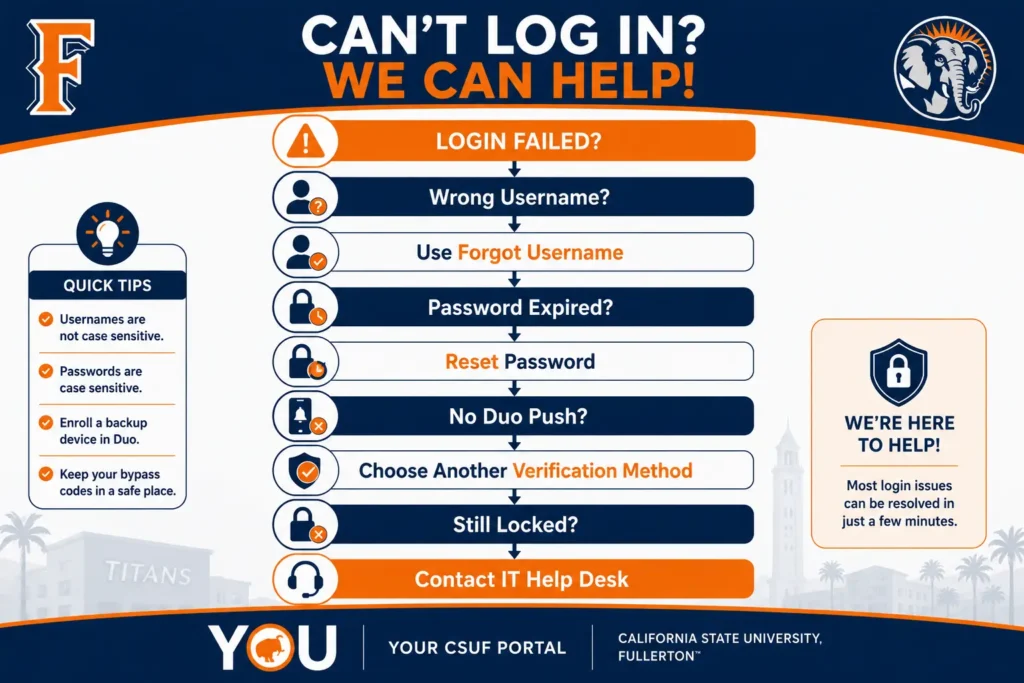
Most sign-in failures come down to three things: wrong username format, an expired password, or a Duo device you don’t have anymore. Each has a straightforward fix, and the help desks are ready for them.
Recover Credentials Or Reset A Password
Start with the recovery links on the portal login page. Forgot your username? confirms the name before the @ in your CSUF email, and the password help link walks you through a reset.
- Make sure you entered the username alone, without
@csu.fullerton.edu - Clear saved credentials or try a private browsing window after a reset
Campus passwords expire on a schedule. If your login worked last month, you might just need a refresh.
Choose Another Duo Verification Method
If the push notification never arrives, open the Duo prompt and pick a different method. A phone call, a text passcode, or a code generated in the Duo Mobile app all work even without a data connection.
Bypass codes help if your phone is lost or replaced. If you’re out of codes, the help desk can issue one after verifying your identity.
Get Official IT Support
Contact the right desk and you’ll spend less time on hold:
- Students: Student IT Help Desk, StudentITHelpDesk@fullerton.edu or 657-278-8888
- Faculty and staff: IT Help Desk, helpdesk@fullerton.edu or 657-278-7777
Fullerton College students should contact Academic Computing Technologies on their own campus instead.